
A QMS quality management system is the set of policies, procedures, records and checks that makes quality repeatable across your business. In short, it is the operating system for quality: it defines how work should be done, proves it was done and fixes what went wrong. Many UAE organisations still run that system on paper checklists, shared folders and email. This guide explains the core elements, where SOPs fit, and how digital inspections replace paper. It is part of our operational excellence solutions series, written business first.
Key Takeaways
- A QMS quality management system turns quality from individual effort into a repeatable routine of procedures, inspections, records, audits and improvement.
- A quality compliance automation platform replaces paper checklists with digital inspections, tracked corrective actions and live dashboards.
- The oil and gas case study shows how ISO compliance automation for oil companies can standardise inspections across multiple sites.
What a QMS Quality Management System Is
A QMS quality management system is a structured way to plan, run, check and improve the work that affects quality. It covers what your customers receive and how your teams produce it. It is not a binder on a shelf. It is the daily routine of procedures, inspections, records and corrective actions that keeps results consistent.
The quality management system idea is not new. Most organisations follow a cycle of plan, do, check and act, often called PDCA. You plan how work should be done. You do the work. You check the result against the plan. Then you act on what you find.
The scope of a QMS quality management system can be narrow or wide. Some organisations start with incoming material checks or final inspections. Others cover the full chain, from supplier selection to customer complaints. Either way, the logic is the same. Define the requirement, check it, record the result and fix the gaps.
Quality as an operating system
Think of a QMS the way you think of the operating system on a laptop. You rarely notice it when it works. Yet every task depends on it. A good system tells people which procedure to follow, which checklist to complete and who signs off. It stores the evidence in one place. When something fails, it starts a corrective action and tracks it to closure. Leaders then see trends instead of anecdotes. That is the real value: quality stops depending on a few experienced people and becomes part of how the business runs.
What a QMS is not
A QMS is not a certificate, a consultant’s report or a document library. Those can exist without the system working at all. Many organisations have well written manuals that nobody follows on site. Others pass an audit, then return to old habits the next week. A working QMS shows up in daily behaviour: inspections completed on time, defects recorded honestly and actions closed with evidence. Upturnist does not certify organisations. We help teams design and run the system itself, so it works on an ordinary Tuesday, not just on audit day.
Core Elements: Policy, Procedures, Records, Audits and Improvement
Every QMS quality management system rests on five elements. A policy sets direction. Procedures define the work. Records prove what happened. Audits check that the system works. Improvement closes the gaps. If one element is weak, the others suffer. Strong records cannot rescue vague procedures, and good audits mean little if findings never close.
The international reference point is ISO 9001, the most widely used quality management standard. You do not need to pursue certification to borrow its logic. Its structure is a sound checklist for any organisation that wants consistent results.
Use the five elements as a quick health check. For each one, ask a simple question. Is the policy known on site? Are procedures current? Are records complete and searchable? Do audits happen on schedule? Do findings close with evidence? A QMS quality management system that answers yes to all five is in good shape.
Policy and objectives
The quality policy is a short statement of what quality means for your business. It should be specific enough to guide decisions. “We deliver every job to specification, on time, with zero repeat defects” is more useful than “we value quality”. Objectives then turn the policy into targets each team can track. Keep them few and measurable. A site manager should be able to explain how their daily work supports each objective. If they cannot, the objectives are too abstract. Review them at least once a year as the business changes.
Procedures and work instructions
Procedures describe how key processes run: who does what, in what order, with which controls. Work instructions go one level deeper, into a single task. Both should be short, current and easy to find. The test is simple. Can a new team member follow the procedure without asking someone? If not, rewrite it. Procedures also define the checks. Each inspection checklist should trace back to a procedure, so inspectors know why each item matters. This link between procedure and checklist is where paper systems often break down.
Records and evidence
Records prove that work followed the procedure. Inspection results, test reports, approvals, photos and signatures all count. On paper, records are hard to search and easy to lose. They also arrive late, often days after the work. Digital records fix all three problems. Each record is timestamped, linked to a site and a person, and searchable in seconds. Photo evidence adds a layer that paper cannot match. When an auditor asks for proof, you produce it on screen rather than searching a store room.
Internal audits and improvement
An internal audit checks whether the system works as designed. Auditors sample records, interview staff and compare practice with procedure. Findings become non-conformities or improvement actions. Improvement is where the system earns its keep. Each finding should have an owner, a due date and a verified fix. Over time, recurring issues should fall. If the same finding appears in every audit, the corrective action treated the symptom, not the cause. Track repeat findings as a key measure of system health.
Where a QMS Meets Your SOPs
Standard operating procedures are the working layer of a QMS. The quality system sets the rules for control, review and evidence. SOPs describe exactly how each process is done. When the two are linked, every inspection checks a defined procedure. When they are separate, teams follow one document and get audited against another.
In practice, a QMS needs a clear hierarchy. At the top sits the quality policy. Below it are the process level procedures. Below those are the SOPs and work instructions that operators use every day. Each level should reference the one above.
Most problems sit at the bottom of that hierarchy. SOPs drift. A supervisor finds a faster way and the team adopts it, but the document never changes. An auditor then finds a gap between practice and procedure. The fix is not more paperwork. It is a review routine where SOP owners confirm, every few months, that the document still matches the work.
Digital tools help in three ways. Version control ensures everyone sees the current SOP. Acknowledgement records show who has read each change. Links from checklists to SOPs let inspectors open the procedure from the inspection screen.
If your procedures are out of date or exist only in people’s heads, start there. Our SOP development service documents processes in a structured, easy to follow format, then keeps them under version control. A QMS quality management system built on clear SOPs is far easier to run and audit.
Paper vs Digital QMS
A paper QMS can work in a single small site with a stable team. It struggles as soon as you add locations, shifts or staff turnover. A digital QMS stores procedures, checklists, records and actions in one system, so the same standard applies everywhere and management can see the state of quality without waiting for reports.
The difference is clearest at the inspection. On paper, an inspector completes a form, signs it and files it. Someone types the results into a spreadsheet later, if at all. Defects are noted but not always assigned. A week later, nobody is sure whether the issue was fixed.
In a digital QMS, the inspector completes a checklist on a tablet or phone. Photos attach to each failed item. The system raises a non-conformity automatically and assigns an owner. The manager sees it the same day.
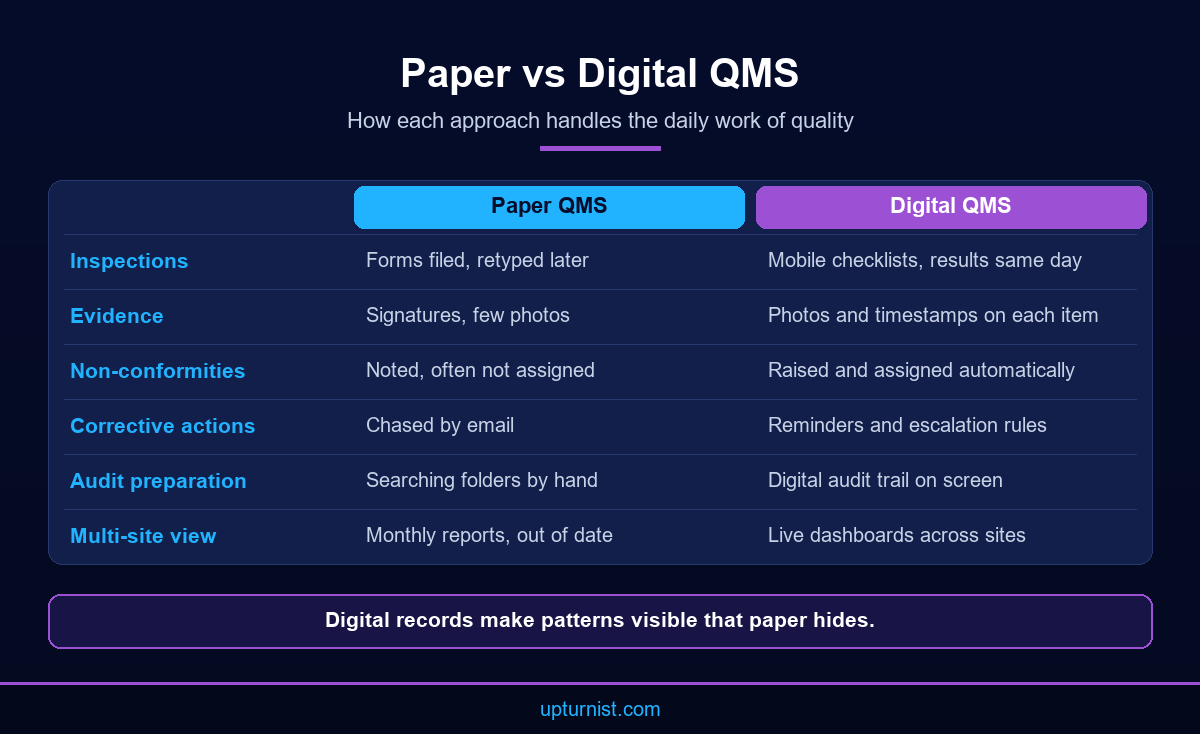
Paper also hides patterns. Ten sites may report the same defect each month. Unless someone reads every form, the trend goes unnoticed. Digital records group findings by site, process and cause, so recurring issues stand out.
Cost is often the objection. Yet paper carries hidden costs: printing, filing, retyping, chasing signatures and preparing for audits by hand. The quality and compliance automation project Upturnist delivered for an oil and gas organisation reported reduced manual paperwork and reporting effort, and faster audit preparation and reporting. Those gains come from removing manual steps, not from adding new ones.
A digital QMS quality management system also scales. Adding a new site means assigning the same checklists and workflows. It does not mean shipping binders and retraining people on a new filing method.
Digital does not mean everything changes at once. Keep the procedures that work. Convert the forms people already know into digital checklists with the same items. Inspectors then learn a new tool, not a new standard. Once the team trusts the system, you can refine checklists and add rules.
One caution applies. Digitising a bad process only makes it faster to do the wrong thing. If a checklist is too long, unclear or disconnected from the procedure, fix it before you move it to a tablet.
Automating Inspections and Non-Conformity Tracking
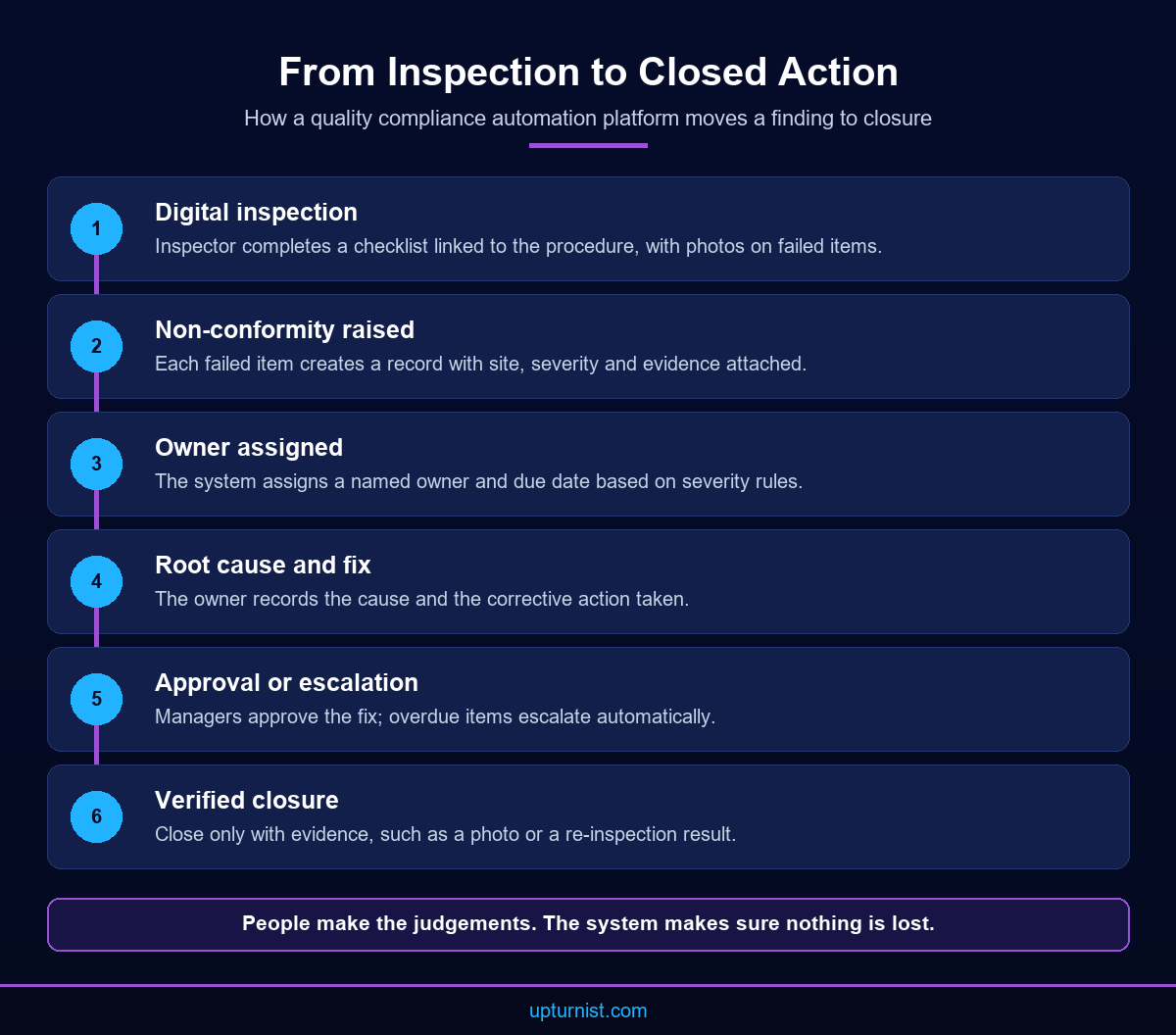
Automation in quality is about removing the manual steps between finding a problem and fixing it. A quality compliance automation platform routes each inspection result, raises non-conformities, assigns corrective actions, sends reminders and escalates overdue items. People still make the judgements. The system makes sure nothing gets lost between them.
This is where most of the value of a digital QMS quality management system sits. Inspections happen daily. Non-conformities follow. If either step runs on paper, the whole system slows down.
The corrective and preventive action cycle is the heart of it. Corrective action fixes a problem that happened. Preventive action stops a likely problem before it happens. Both need the same discipline: an owner, a deadline and proof.
Digital checklists that match your standards
A digital checklist should mirror the procedure it checks. Each item has a clear pass or fail rule, and failed items require a photo or comment. In the oil and gas case study, inspectors used digital checklists aligned with ISO requirements, with photo evidence and supporting documents. That alignment matters. When an auditor asks how an ISO clause is checked, the answer is a specific checklist item with a history of results. Build checklists with the people who use them, test them on site, and keep them short enough to finish properly.
Non-conformities and corrective actions
A non-conformity is any failure to meet a requirement. Each one needs a record, an owner, a root cause and a fix. On paper, these often stall in an inbox. A digital workflow assigns the action at once, sets a due date and sends reminders. The case study platform automated corrective action management with notifications and escalation rules. That turns “someone should fix this” into a named person with a deadline. Close each action only with evidence, such as a photo or a re-inspection result.
Approvals and escalation rules
Not every finding needs the same response. A minor housekeeping issue can close at site level. A critical defect may need a manager’s sign off within hours. Define these rules before you automate them. Set severity levels, approval paths and time limits for each. Then let the system route items and escalate anything overdue. This keeps senior managers focused on the issues that matter. It also gives auditors a clear record of who approved what, and when.
Dashboards for Quality Managers
A quality dashboard turns inspection records and actions into a live picture of performance. Quality managers should see what is overdue, where defects cluster and whether sites are improving. A good dashboard answers those questions in seconds and replaces the monthly report that took days to compile and was out of date on arrival.
Start with a small set of measures. Useful ones include inspections completed against plan, open non-conformities by age, corrective actions overdue, repeat findings and audit readiness by site. Each measure should prompt an action. If a number goes red, someone should know what to do next.
Avoid the temptation to track everything. A dashboard with forty charts is a report, not a tool. Aim for one screen that a manager checks every morning, with drill downs for detail.
Different roles need different views. A site supervisor needs today’s inspections and their own open actions. A quality manager needs trends by site and process. Senior leaders need a short summary of risk, overdue actions and audit readiness. A QMS quality management system should serve all three from the same data, so everyone works from one version of the truth.
In the oil and gas case study, management dashboards gave real time visibility into compliance performance, pending corrective actions, audit readiness and quality KPIs across all operational sites. That visibility is what lets leaders act early rather than react after an audit.
Dashboards depend on clean data. If inspections are recorded in different ways at each site, the totals mean little. Standard checklists and clear definitions come first. Our digital transformation services and our wider enterprise reporting and business intelligence work help connect quality data with other operational KPIs.
Multi-Site Quality: Keeping Standards Consistent
Quality is hardest to manage across many sites. Each location develops its own habits, forms and shortcuts. Over time, the same standard means different things in different places. A digital QMS fixes this by giving every site the same checklists, workflows and definitions, and by letting head office compare results like for like.
The oil and gas organisation in our case study faced this exact problem. It ran quality inspections against multiple mandatory ISO manuals across various operational sites. Records were kept by hand, so consistent implementation was hard to prove. Tracking corrective actions and preparing for audits took significant manual effort. Management had no real time view of recurring issues across locations.
Upturnist designed and implemented a centralised quality and ISO compliance platform. It digitised the full inspection lifecycle. The outcomes on the case study page include standardised quality inspections across all locations, improved compliance with mandatory ISO standards and better corrective action accountability. It is a clear example of ISO compliance automation for oil companies, though the same approach suits manufacturers, fabricators and facility managers. You can see the sectors we support on our industries page.
For any multi-site QMS quality management system, two rules make the biggest difference.
Standardise first, then localise
Agree one master checklist for each inspection type. Then allow limited, controlled site variations, such as extra items for a specific process. Use the same severity levels, the same approval rules and the same action deadlines everywhere. Otherwise a “minor” finding at one site may be “major” at another, and the totals stop meaning anything. Record every variation in the system so auditors can see it. Without this rule, sites copy and edit forms until no two match. Central control of templates, with clear ownership, keeps the standard intact while respecting real local differences.
Compare sites fairly
Once data is consistent, compare sites on the same measures. Look at completion rates, open actions and repeat findings. Use the comparison to share good practice, not just to rank. A site with low defects may have a method worth copying. A site with high defects may need training, equipment or clearer procedures. The same thinking applies to safety, as our HSE inspection automation project for a fuel distribution network shows.
Getting Started With a Digital QMS
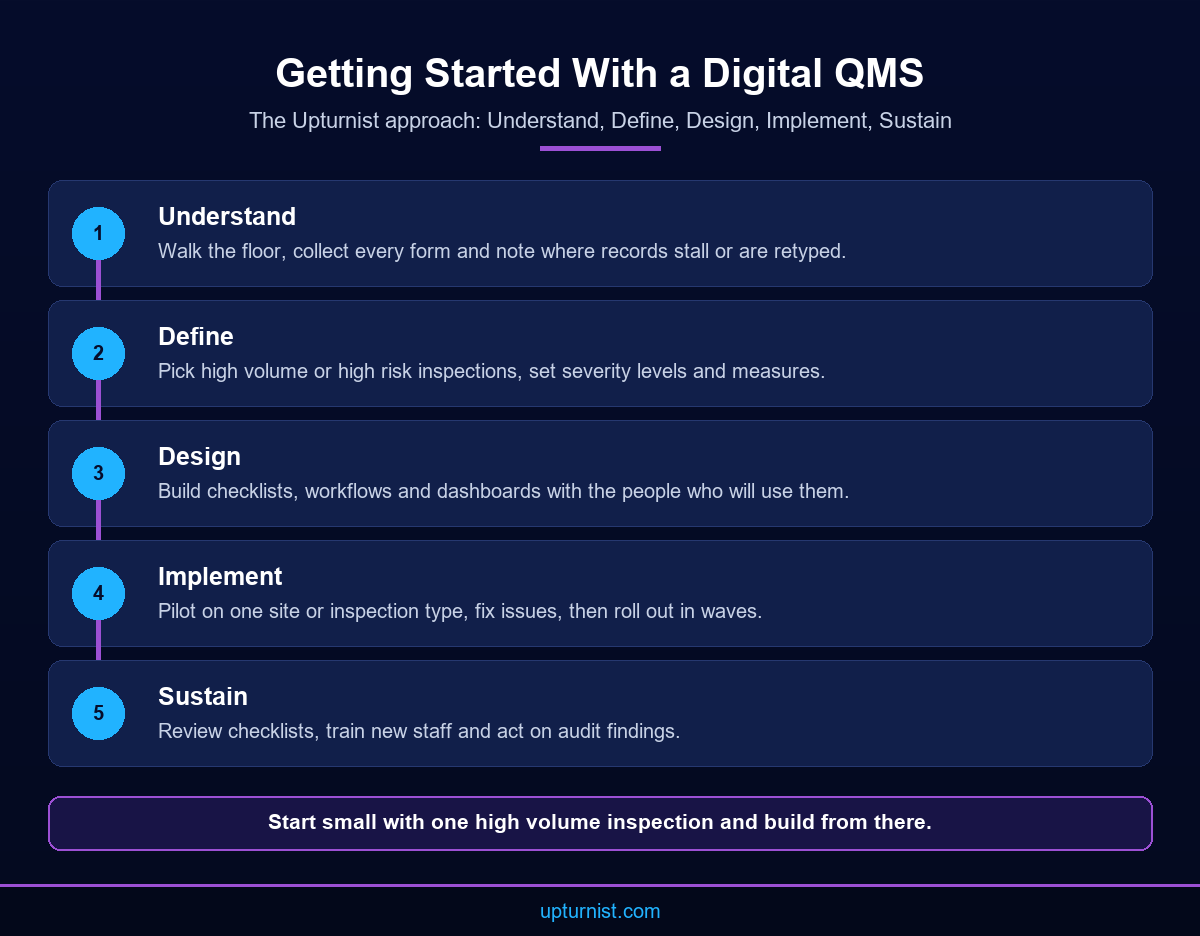
Moving from paper to a digital QMS works best in stages. Map how quality is managed today. Define the standards and checklists you need. Design the workflows and roles. Implement on a pilot site. Then sustain the system with reviews and training. This follows the Upturnist approach: Understand, Define, Design, Implement and Sustain.
Begin with the Understand stage. Walk the floor with inspectors and supervisors. Collect every form, spreadsheet and manual in use. Note where records are retyped, where approvals stall and where actions are lost. This baseline shows where a quality compliance automation platform will save the most time.
In the Define stage, decide which processes the QMS covers first. Pick the inspections with the most volume or the most risk. Agree severity levels, approval rules and the measures you will track.
The Design stage turns those decisions into checklists, workflows and dashboard views. Involve the people who will use them. A checklist designed in an office often fails on site.
Then Implement on one site or one inspection type. Fix what does not work. Roll out in waves. Finally, Sustain the system: review checklists, retrain new staff and act on audit findings.
Ownership matters at every stage. Name a quality lead who owns the system, not just the software. Give each checklist and SOP a named owner too. Without owners, a QMS quality management system slowly decays, however good the tools.
Measure the pilot honestly. Compare inspection completion, time to close actions and audit preparation effort before and after. Use your own numbers, not promises. That evidence makes the case for the wider rollout. You can see how we work, and why we put business first, process second and technology third, on our about Upturnist page. Our business transformation consulting supports this whole journey. Our field operations automation solutions cover the mobile inspection side.
Conclusion
A QMS quality management system is only as strong as its daily routine. Clear procedures, consistent inspections, honest records and closed actions matter more than the thickness of the manual. Paper can hold a small operation together, but it hides patterns and slows every fix. A digital system standardises checklists, tracks non-conformities to closure and gives managers a live view across sites. Start small, with one high volume inspection, and build from there. To plan your move from paper to digital quality and improve the way you operate, talk to our consultants about your current process.
Frequently Asked Questions
What is a QMS quality management system?
It is the structured set of policies, procedures, records, audits and improvement routines that makes quality consistent. It defines how work should be done, proves it was done and corrects what went wrong, so results do not depend on individuals.
Is ISO 9001 the same as a QMS?
No. ISO 9001 is an international standard that describes requirements for a quality management system. Your QMS is the system you actually run. Many organisations use ISO 9001 as a framework, whether or not they pursue certification.
Does Upturnist certify organisations against ISO standards?
No. Upturnist does not certify organisations. We help teams design and run the system itself: procedures, digital checklists, workflows and dashboards. Certification, where needed, is carried out separately by an independent certification body.
What is a quality compliance automation platform?
It is software that digitises quality work. Inspectors complete checklists on mobile devices, the system raises non-conformities, assigns corrective actions, sends reminders and escalates overdue items. Managers see live dashboards instead of waiting for monthly reports.
How do digital checklists improve inspections?
They make every inspector follow the same steps, require photos or comments on failures and timestamp each record. Results reach managers the same day. Because data is consistent, trends across sites and processes become visible quickly.
What is a non-conformity in quality management?
A non-conformity is any failure to meet a requirement, whether from a procedure, a customer specification or a standard. Each one should be recorded, assigned an owner, investigated for root cause and closed with evidence of the fix.
How long does it take to move from paper to a digital QMS?
It depends on the number of sites, inspection types and the state of existing procedures. Most organisations start with a pilot on one high volume inspection, then roll out in waves. Clear procedures first make every later step faster.
Which industries benefit from quality compliance automation?
The case study page lists oil and gas, manufacturing, fabrication, construction, utilities, food and beverage, pharmaceutical, healthcare, logistics, government and facility management organisations. Any business running regular inspections across several sites can benefit.
Can a digital QMS work alongside our ERP?
Yes. Quality data often needs to connect with production, procurement or maintenance records. Our technology consulting team can review your current systems and plan how quality records and operational data should flow between them.
Where can I see examples of Upturnist quality projects?
Upturnist publishes anonymised examples across oil and gas, contracting, manufacturing and infrastructure. Browse our library of project case studies to see the challenges, solutions and business outcomes in each project, including our quality and HSE inspection work.