

ISO compliance automation for oil companies replaces paper inspection forms with digital checklists, photo evidence and tracked corrective actions. Every site then records compliance as part of daily work, instead of rushing to prepare before each audit. This guide explains the automation side, from checklist design to non-conformity tracking and audit trails.
Advice tells you what a standard requires. Automation makes sure every site does it the same way, every time. At Upturnist, we build these systems with a business first, implementation focused approach. The examples below draw on a quality and ISO project we delivered for an oil and gas organisation in the UAE.
Key Takeaways
- Digital checklists aligned with ISO requirements make inspections consistent across sites and capture evidence at the point of work.
- Automated workflows track every non-conformity and corrective action until closure, with notifications and escalation.
- Complete audit trails and live dashboards turn audit preparation from a scramble into a routine report.
Why Paper Compliance Fails in Multi-Site Oil Operations
Oil and gas operations run across many sites, shifts and teams. When ISO inspections live on paper and spreadsheets, each site drifts into its own way of working. Corrective actions get lost between inspections. Management cannot see compliance status without chasing reports. ISO compliance automation for oil companies exists to close exactly these gaps, starting with the inspection itself.
The organisation in our case study faced this problem. It managed quality inspections against several mandatory ISO manuals across different operational sites. Records were kept manually, so it was hard to apply quality standards consistently. Tracking corrective actions and preparing for audits took significant manual effort.
Visibility was the other gap. Management lacked a real-time view of inspection performance, recurring quality issues and compliance by location. As operations expanded, keeping standards consistent became harder. The answer was a quality compliance automation platform that digitised the full inspection lifecycle.
Audit season shows the cost most clearly. Teams pull folders from several sites, check signatures and chase missing photos. Evidence that should take minutes to find can take days. Meanwhile, the quality team spends its time on paperwork rather than on improvement.
These problems rarely come from careless people. They come from a process that depends on paper moving between sites, offices and inboxes. If this sounds familiar, speak with our consultants about where your current process loses information.
Digital Checklists and Evidence Capture
Automation starts with the checklist. Each inspection item should trace back to a requirement in your ISO manuals or internal procedures. Inspectors complete the checklist on a mobile device, attach photos and documents, and submit from site. This step gives every location the same standard and every finding the same quality of evidence.
In the case study, quality inspectors used digital checklists aligned with ISO requirements. They captured photo evidence and supporting documents during each inspection. Every inspection followed one standardised process, whatever the site. That consistency is the base for ISO compliance automation for oil companies, because results can only be compared when everyone checks the same things.
Good checklists depend on good procedures, whichever quality compliance automation platform you choose. If your procedures are out of date or unclear, the checklist will copy those gaps. It is worth getting your documented procedures right first, then building checklists from them. A few design rules help:
- Write each item as a clear question with a defined pass standard.
- Make photo evidence mandatory for every failed item.
- Link each item to the clause or procedure it tests.
- Grade findings by severity so the workflow knows how fast to respond.
- Let the quality team update checklists through a controlled approval step.
Evidence capture deserves its own test. Each photo should carry the date, time and site automatically, so nobody has to label it later. Supporting documents, such as permits or calibration records, should attach to the inspection record itself. When an auditor asks for proof, the record already holds it.
Field connectivity also matters. Some locations have weak signal, so the mobile app should work offline and sync when the connection returns. Ask to see this working before you commit, because it is a common gap in ISO compliance automation for oil companies at remote sites. If remote locations are a concern for you, talk through your inspection workflow with us.
Non-Conformity Tracking and Corrective Actions
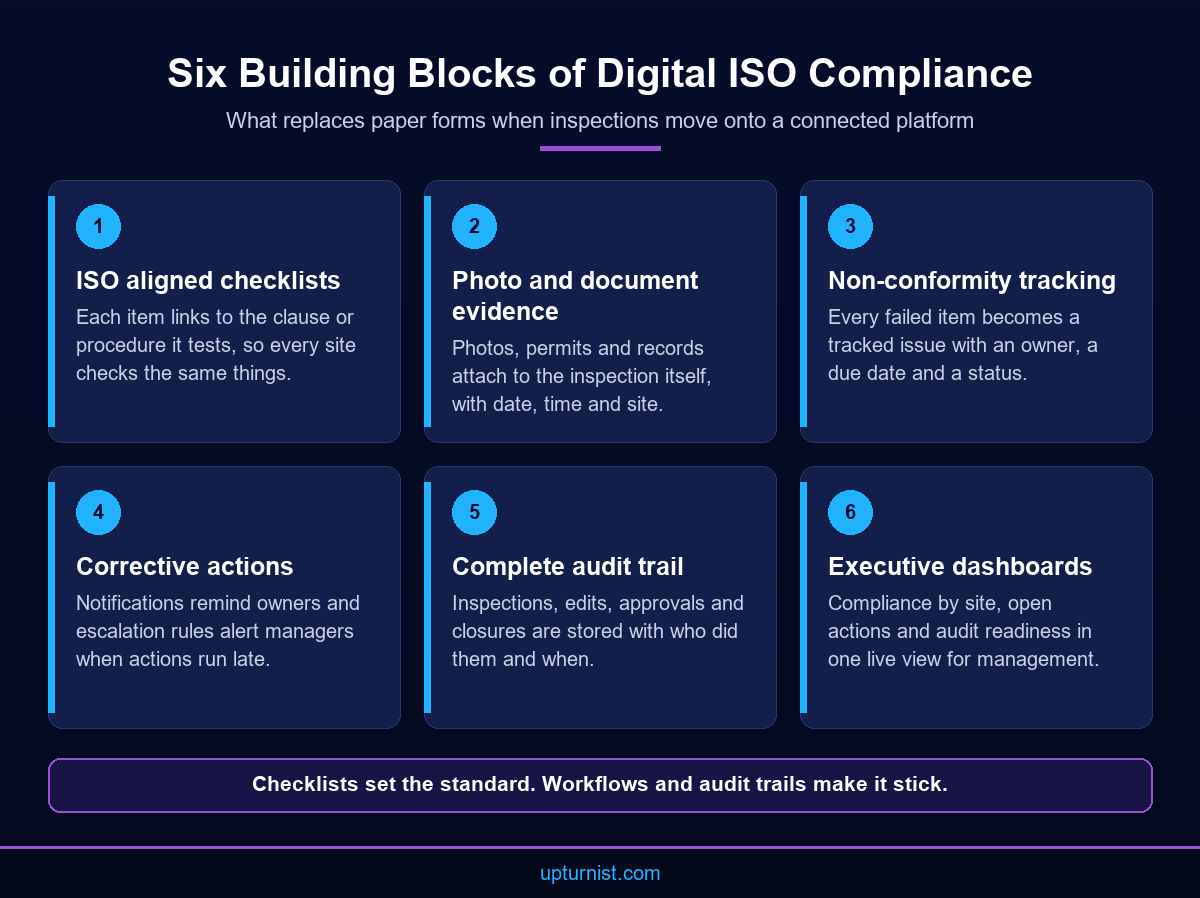
A finding only matters if someone fixes it. Automation turns each failed checklist item into a tracked non-conformity with an owner, a due date and a status. Notifications remind the owner, and escalation rules alert managers when actions run late. This is the digital form of corrective and preventive action.
Corrective action means action taken to eliminate the causes of non-conformities so they do not recur. Paper systems make this hard. A form records the problem, but nobody can easily see whether the fix happened or whether the same fault appears at other sites.
With ISO compliance automation for oil companies, the workflow carries each issue from detection to verified closure. The case study platform automated approval workflows, corrective action management and non-conformance tracking. It assigned and monitored actions with automated notifications and escalation rules. The business outcomes included better corrective action tracking and accountability.
Approval workflows add a second layer of control. A supervisor reviews serious findings before they are closed, and the system records each decision with a time stamp. Closure then means the fix was checked, not just reported.
Root cause is where the real value sits. When findings are digital, recurring issues show up as patterns across sites. The quality team can then fix the cause once, rather than closing the same finding again and again. Mapping how findings move between sites today is a useful first exercise.
Audit Trails, Dashboards and a Staged Rollout
Audits test evidence, not intentions. An automated system keeps the inspection history, approvals, photos and documents together in one place. Dashboards show compliance by site, open actions and audit readiness at a glance. A staged rollout then brings each site onto the same process without disrupting daily operations or overloading the quality team.
An audit trail is a chronological record that provides documentary evidence of the sequence of activities affecting a procedure or event. In a compliance system, that means every inspection, edit, approval and closure is stored with who did it and when. In the case study, the platform maintained complete digital audit trails, inspection history and supporting documents. The outcome was faster audit preparation and reporting.
Dashboards give management the wider view, and any quality compliance automation platform should make them easy to read. The case study dashboards showed compliance performance, pending corrective actions, audit readiness and quality KPIs across all operational sites. These are the same building blocks behind our operational excellence solutions for inspections, SOPs and reporting.
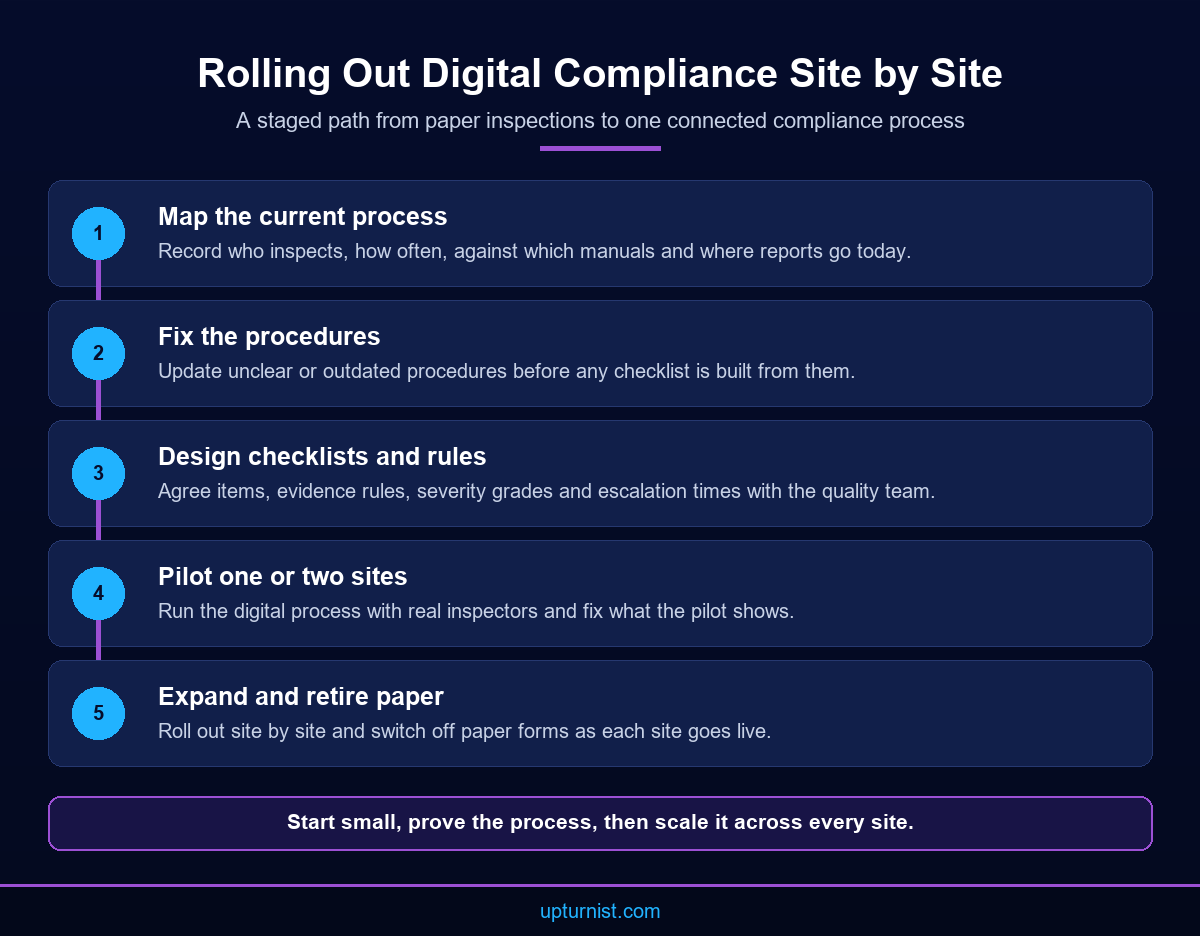
Roll out in stages rather than switching every site at once. Map the current inspection process, then design checklists and workflows with the quality team. Pilot at one or two sites, fix what the pilot shows, and expand site by site. ISO compliance automation for oil companies works best when paper forms are switched off as each site goes live. Our work on mobile field inspection systems follows the same pattern.
Measure progress with a few simple indicators. Track inspections completed on schedule, open actions by severity and the time each action takes to close. Start from the pilot data, so you can show improvement with real figures rather than impressions.
Conclusion
Manual compliance struggles once operations spread across many sites. ISO compliance automation for oil companies gives every site the same digital checklist and captures evidence in the field. Upturnist designs and implements these systems for oil and gas teams. Each non-conformity is tracked to closure, and a complete audit trail is kept. Dashboards then show management where compliance stands, without manual reports. The software supports your management system, but it does not certify it. Start with clear procedures and sound checklists, then roll out in stages. When you are ready, book a conversation with our team about your sites.
Frequently Asked Questions
What is ISO compliance automation for oil companies?
It is a digital system that runs quality and compliance inspections across sites. Inspectors use ISO aligned checklists on mobile devices, findings become tracked corrective actions, and every record is stored in an audit trail that managers can review on dashboards.
Does automation make a company ISO certified?
No. Certification comes from an independent certification body after an audit. Automation helps you run the management system consistently and keep evidence organised, which makes audits easier, but the organisation still has to meet every requirement itself.
What should a quality compliance automation platform include?
It should include digital checklists, photo and document evidence, non-conformance tracking, corrective action workflows with escalation, audit trails and dashboards. Offline mobile use and controlled checklist updates matter for field sites with weak connectivity.
How do digital checklists stay aligned with ISO requirements?
Each checklist item links to the clause or procedure it tests. When a manual or procedure changes, the quality team updates the checklist through a controlled approval step, and the new version reaches every inspector at the same time.
Can one system handle quality and HSE inspections?
Yes. The same checklists, workflows and dashboards can serve quality, safety and environmental inspections. Many organisations start with one inspection type, prove the process at a pilot site, and then add others once teams trust the system.
How long does a rollout take?
It depends on the number of sites, checklists and users, and on how current your procedures are. A pilot at one or two sites shows the real pace. Most effort goes into procedures and checklists, and Upturnist can help plan it.
What happens to existing paper records?
Most teams keep historic paper records archived for reference and start digital records from the go live date. Recent open findings are usually entered into the new system so corrective actions can be tracked to closure without a gap.
Who should own the checklists?
The quality or compliance team should own checklist content and approve every change. Site managers and inspectors should give feedback on items that are unclear. Shared ownership without a named owner tends to leave checklists outdated.
Which industries benefit beyond oil and gas?
Manufacturing, fabrication, construction, utilities, pharmaceuticals, healthcare, logistics and facility management all inspect against standards. Our digital transformation services apply the same approach to inspections, approvals and reporting in each of these sectors, from single plants to large networks.