

ERP implementation is the work of turning chosen software into a system your business runs on every day. A typical ERP implementation moves through six phases: discovery, design, build, data migration and testing, training, and go live with support. Most guides describe what the implementation partner does. This one focuses on what your own team must own at each phase, because that is where many projects slip. It also covers the roles you need and the pitfalls that delay go live. For the wider picture, see our enterprise systems and ERP solutions page.
Key Takeaways
- A successful ERP implementation depends as much on your team as on the partner. Decisions, data and testing belong to you.
- Every phase of an ERP system implementation needs a named owner, a clear exit criterion and a written sign off.
- Compare ERP implementation companies on how they share responsibilities, not only on price.
The Six Phases of an ERP Implementation
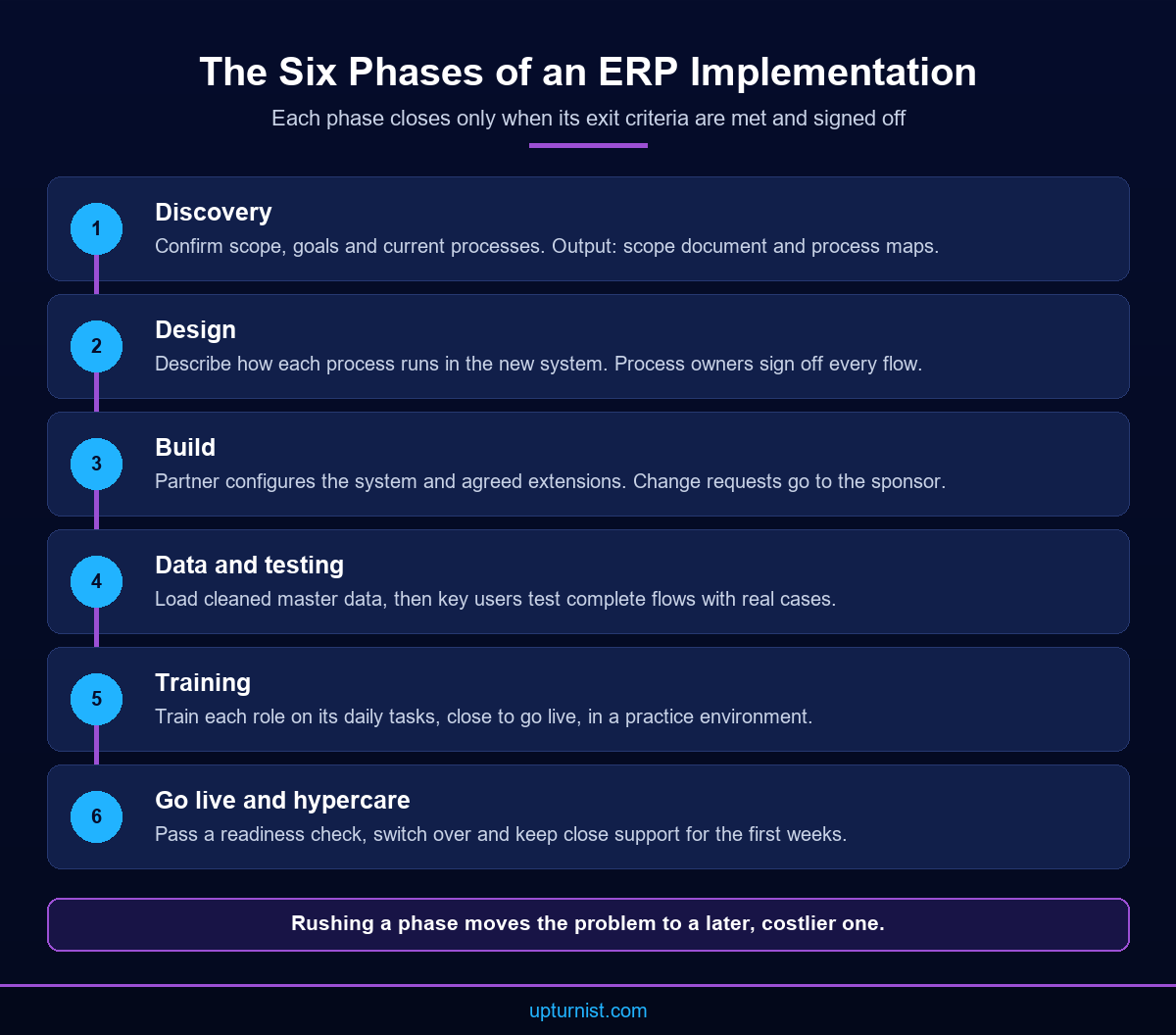
An ERP implementation follows six phases: discovery, design, build, data migration and testing, training, and go live with hypercare. Each phase has its own output and its own sign off. Skipping or rushing a phase rarely saves time. It moves the problem to a later phase, where fixing it costs more and affects more people.
Discovery confirms scope, goals and current processes. The output is an agreed scope document and process maps. Design describes how each process will run in the new system, including approvals, documents and reports. Build is where the partner configures the system and develops any agreed extensions or interfaces.
Data migration and testing run closely together. Master data is cleaned and loaded, then key users test complete business flows with that data. Training prepares each role for its daily tasks. Go live moves the business onto the new system, and hypercare provides close support for the first weeks.
Treat the phase list as a set of gates. A phase closes only when its exit criteria are met. For design, that means process owners have signed off every flow. For data migration, it means process owners have checked and approved the loaded records. For testing, it means critical processes pass user acceptance testing with real data.
Roles Your Business Must Fill
An ERP system implementation needs people from your business, not just from the partner. The core roles are an executive sponsor, a project manager, process owners and key users. Each role needs time released from daily work. If these roles are missing or overloaded, decisions stall and the system ends up designed around guesses.
The executive sponsor owns the budget and the big decisions. They settle disputes between departments and approve changes to scope. The project manager runs the plan day to day, tracks actions and keeps the partner accountable.
Process owners lead each area, such as sales, procurement, production, stores and finance. They decide how their process should work in the new system and sign off the design. Key users are the people who know the daily detail. They test the system, report issues and later train colleagues. Release them for agreed days each week. An ERP implementation that relies on spare time from busy staff will run late.
Write these roles down in a simple responsibility assignment matrix. For each deliverable, name who does the work, who approves it and who must be consulted. Clear roles also support wider change. Our organisational transformation and change management work starts from the same principle: clear responsibilities before new systems.
Your Responsibilities at Each Phase
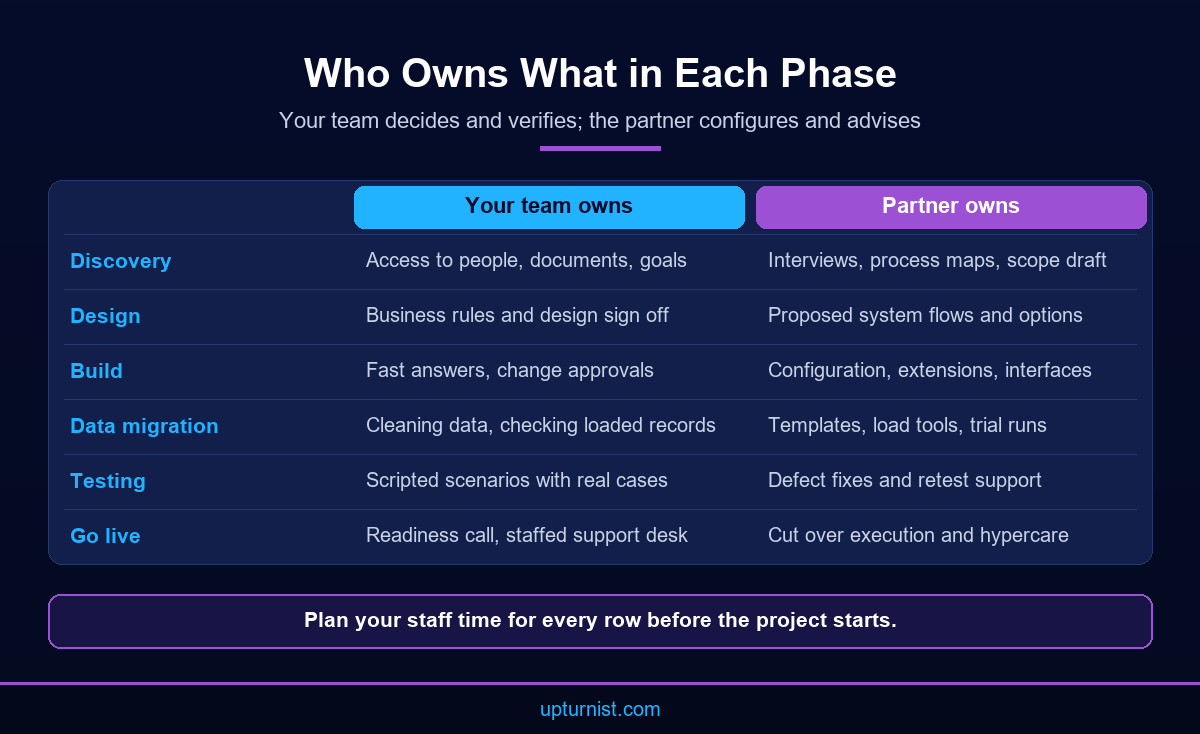
In any ERP implementation, the partner configures and advises, but your team decides and verifies. You own the business rules, the data, the testing and the readiness of your people. Knowing this before the project starts helps you plan staff time and avoid the delays that come from waiting on internal decisions.
In discovery, you provide access to people, documents and current reports. You also confirm what success looks like. In design, process owners review each proposed flow against real cases and sign it off. Documented procedures help a great deal here. If your processes are not written down, standard operating procedure development before design can save weeks of debate.
During build, you answer questions quickly and approve or reject change requests. In data migration, you clean master data and check loaded records against the source. Data migration is a business task as much as a technical one, because only your team knows which records are correct.
In testing, key users run scripted scenarios, including difficult cases such as partial deliveries and rework. In training, you release staff to attend. At go live, you confirm readiness, freeze old systems and staff the support desk with your key users.
Common ERP Implementation Pitfalls and How to Avoid Them
Most ERP implementation problems are predictable. They come from unclear decisions, poor data, weak testing, late training and too much customisation. None of them is a software problem at heart. Each one has a simple counter measure that your team can put in place before the project starts.
Unclear decisions come first. When no one can settle a disagreement between departments, design stalls. Give the sponsor authority and a fixed weekly slot for decisions.
Poor data is next. Duplicate customers, wrong item codes and old prices undermine trust from day one. Start cleaning early and run at least two trial migrations.
Testing with demo data hides problems. Test with your own jobs, your own customers and your own exceptions. Late training leaves users unsure on go live day. Train by role, close to go live, in a practice environment.
Over customisation is the last trap. Every custom feature adds testing and upgrade effort. Change the process first, then configure, and only then build. Avoid going live during a peak period or at month end close. Finally, plan hypercare. Without it, small issues pile up and users drift back to spreadsheets.
One more pitfall is treating go live as the end. An ERP implementation only pays off when people use the data to run the business. Set a few measures before the project, such as billing time or stock accuracy. Review them a few months after go live, then plan the next phase from what you find.
How to Judge ERP Implementation Companies
ERP implementation companies differ less in their slides and more in how they work with your team. Ask how they split responsibilities, who will be on site, how they test and what support they give after go live. Their answers tell you more than any reference list or demo.
Ask to see a sample project plan with roles marked for both sides. Ask who writes the test scripts and who leads data migration. Ask how change requests are priced and approved. Ask what happens in the first month after go live: who answers user questions, how fast blocking issues are fixed and when support moves to normal terms. Request a named contact for each phase. If the answers are vague, expect the same vagueness when problems appear mid project.
Look for experience in your type of operation. A fabrication business needs a partner who understands estimation, work orders and quality inspection. A published UAE engineering company case study shows what that looks like in practice. Manual QC reports were replaced with digital inspections and electronic reports, with live dashboards for production and inventory.
Finally, check how the partner handles integration. Your ERP will need to connect with other systems and, in time, with UAE e-invoicing platforms. Technology consulting and systems integration support helps you plan those links before build starts, not after go live.
Conclusion
A smooth ERP implementation comes from clear phases, named roles and a client team that owns its decisions, data and testing. The partner brings method and configuration skill. Your business brings knowledge and authority. Plan staff time early, close each phase with a sign off and guard against the common pitfalls of poor data, weak testing and over customisation. Do that, and the new system will improve the way you operate rather than add friction. To plan your next phase, speak with our implementation consultants for a business first view.
Frequently Asked Questions
What are the main phases of ERP implementation?
The main phases are discovery, design, build, data migration and testing, training, and go live with hypercare. Each phase should end with a written sign off. Closing phases properly prevents problems moving downstream, where they cost more to fix.
Who should lead an ERP system implementation inside the business?
An executive sponsor should own decisions and budget, supported by a project manager who runs the plan day to day. Process owners sign off designs for their areas. Key users test the system and later train their colleagues.
What does the client do during build?
The client answers design questions quickly, approves or rejects change requests and starts cleaning master data. Slow answers during build are a common cause of delay. Keep a weekly decision slot with the sponsor to clear open questions.
How much customisation is sensible?
As little as possible. Change the process first, configure second and build custom features only when a real business need remains. Every customisation adds testing effort and makes future upgrades harder, so record the reason for each one.
How do we test an ERP before go live?
Key users run scripted scenarios with real data, covering normal and difficult cases such as rework, partial deliveries and returns. Every critical process must pass before go live. Log every defect and retest after each fix.
When is the best time to go live?
Choose a quiet period, away from month end close and seasonal peaks. Go live only after a readiness check confirms signed off data, passed testing, trained users and a staffed support desk. A short delay costs less than a failed start.
How do ERP implementation companies differ?
Some configure to a specification and step back, while others work beside your process owners in every phase. Compare their project plans, testing approach, data migration ownership and support after go live, not only their price.
Can an ERP improve job costing in manufacturing?
Yes, when the design captures materials, labour and production data against each job. A published steel manufacturing project reports complete visibility of estimated versus actual project costs after implementation, along with better material planning.