

ERP consulting is independent help to choose, implement and run an ERP system that fits the way your business operates. Good ERP consulting starts with your processes, not with a software demo, and it stays with you after go live. In the UAE, many manufacturers, fabricators and contractors buy software first and fix processes later. That order is expensive. This guide covers the full journey: requirements, selection, implementation, integration, training and measurement. It draws on published Upturnist projects and our enterprise digital transformation solutions, seen from an operations point of view.
Key Takeaways
- ERP consulting should begin with process mapping, so requirements reflect how work really flows from enquiry to invoice.
- The best ERP consulting companies compare options objectively, test them with your own data and say so when a system does not fit.
- Choose ERP implementation companies that own training, data migration and support after go live, not only configuration.
What ERP Consulting Covers (and What It Should Not)
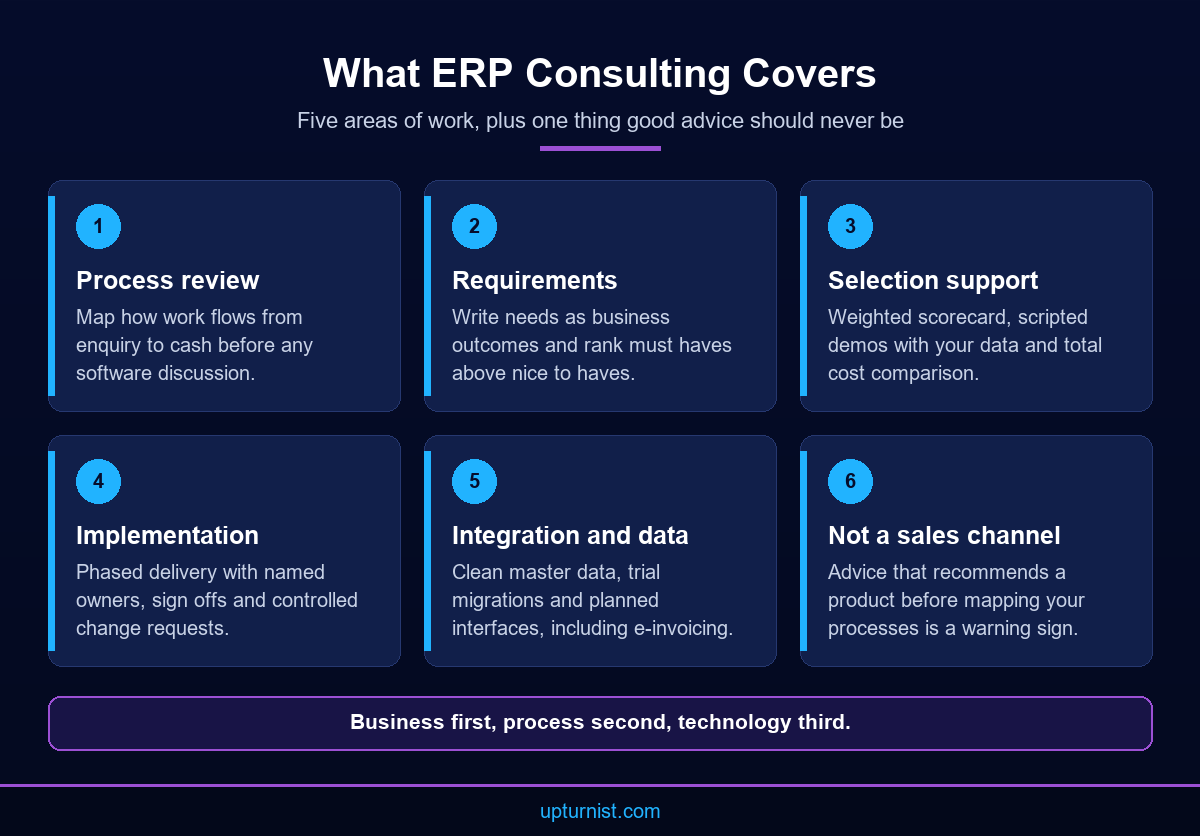
ERP consulting is a structured service. It helps a business decide what it needs from an ERP, pick the right option and make it work in daily operations. The consultant sits between your management team and the software. A good one translates operational problems into system requirements, then holds the project to them.
In practice, ERP consulting covers five areas. First, process review and requirements. Second, selection support, including scripted demos and cost comparison. Third, implementation planning and delivery. Fourth, integration and data migration. Fifth, training, go live support and measurement. Upturnist frames this work as Understand, Define, Design, Implement, Sustain. The order matters: business first, process second, technology third.
What should ERP consulting not be? It should not be a sales channel for one product dressed up as advice. If a consultant recommends a system before mapping your processes, treat that as a warning sign. It should also not be a paperwork exercise. A thick requirements document that nobody uses during configuration adds cost without reducing risk.
ERP consulting is also not a replacement for your own people. Consultants bring method and experience. Your team brings knowledge of customers, suppliers, products and exceptions. The project needs both. When a business hands everything to outsiders, the system often reflects how the consultant thinks you work, not how you actually work.
If you are comparing ERP consulting companies, ask each one to explain its method in plain terms. Ask who will map processes, who writes test scripts and who supports users in the first month after go live. Ask how they handle a requirement the chosen software cannot meet. A strong answer covers process changes, configuration options and small extensions, in that order.
A vendor neutral ERP consulting firm will also tell you when you do not need a new ERP at all. Sometimes the real problem is a broken approval flow or missing procedures. Fixing those first, through a business process assessment, can make a later ERP project faster and simpler. It also gives you cleaner processes to automate.
Finally, set expectations about time. ERP consulting is not a one week workshop. It runs alongside the project, from the first process walk to the review after go live. Agree at the start which stages the consultant will lead and which your team will own.
Requirements: Start From Your Processes
Requirements are the foundation of any ERP project. Weak requirements lead to weak selection, long configuration cycles and unhappy users. The fix is simple to say and hard to do. Start from how work flows today, not from a feature list copied from a brochure. Good ERP consulting spends real time here, because every later decision depends on it.
Map the flow from enquiry to cash
Begin with one end to end flow: enquiry, quotation, order, delivery, invoice and payment. Walk it with the people who do the work. Note every hand off, spreadsheet, approval and delay. In a fabrication business, that might include estimation, drawing approval, material requisition, cutting, welding, painting, inspection and dispatch. In contracting, it might include equipment allocation, operator scheduling, timesheets and billing. A business process mapping exercise like this shows where information is lost and where a system can genuinely help.
Separate must haves from nice to haves
Once the flows are mapped, list what the system must do to support them. Write each requirement as a business outcome. For example: “Show estimated versus actual cost for each job, updated as materials are issued.” Then rank the list. Must haves are the requirements without which the business cannot run. Nice to haves can wait for a later phase. This ranking protects the budget and keeps selection focused on what matters most.
Capture exceptions and reports
Most ERP problems hide in exceptions. Partial deliveries, rework, returned materials, customer variations and split invoices all need a defined path. Ask each department head which reports they use every week. Then ask which decisions those reports support. If a report does not drive a decision, leave it out. Fewer, better reports make the system easier to build, test and use.
Process documentation helps at this stage. Clear documented standard operating procedures give the project team a reliable picture of how work should be done, not just how it happens on a busy day. ERP consulting at the requirements stage should end with a signed off requirements list, a set of process maps and a short list of the reports management actually uses.
Generic ERP vs Industry ERP
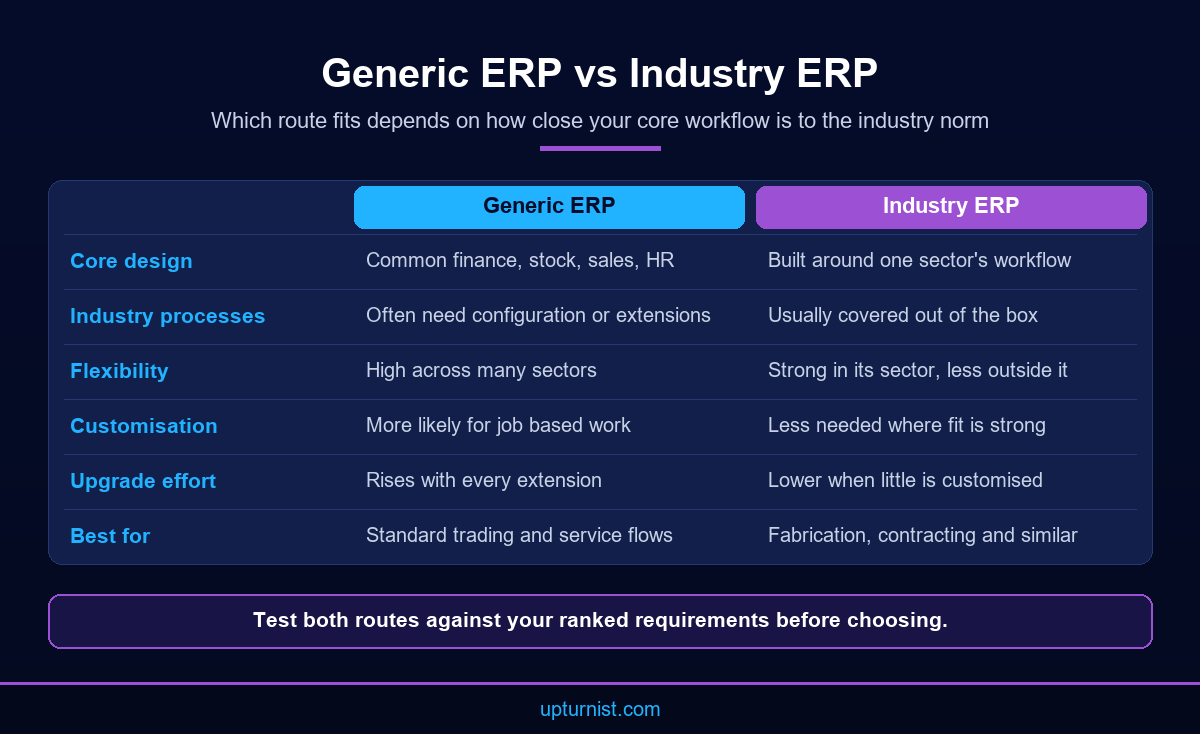
One early decision is whether a generic ERP or an industry ERP fits better. A generic ERP covers common functions such as finance, purchasing, inventory, sales and HR. It is flexible, but it often needs configuration or extensions for industry specific work. An industry ERP is built around one sector’s workflow, such as fabrication, contracting or distribution. It handles the core flow out of the box but may be less flexible outside it.
Neither is always better. The right answer depends on how close your core workflow is to the industry norm. It also depends on how much of your value comes from doing things differently.
Consider a fabrication business. Its core flow runs from estimation through material planning, production, quality control and delivery. Job costing sits at the centre. A generic system can handle this, but it may need significant setup for bills of materials, drawing revisions, cut lists and work order tracking. A fabrication focused system may already cover them.
A steel manufacturing ERP rollout published by Upturnist illustrates the point. The company relied on disconnected processes. Management could not easily compare estimated cost with actual project cost. Material shortages caused production delays, and inventory records often disagreed with physical stock. The implemented solution connected enquiry and estimation, procurement, inventory, production, quality control, delivery and finance on one platform. Dashboards showed project costs and material consumption in real time.
Contracting firms face a different shape of problem. A general contracting equipment rental project shows how equipment assignments, operator scheduling and timesheets were once handled manually. The result was double bookings, scheduling conflicts and delayed billing. The fix was a system built around the rental lifecycle rather than a general purpose module.
ERP consulting should test both routes against your ranked requirements. Ask how much configuration each one needs, who maintains it and what happens at upgrade time. Strong industry fit reduces customisation. Customisation usually adds long term cost and upgrade effort.
A practical test helps. Take your five most important requirements and ask each option to show them live. Count how many need custom work. ERP consulting that records this count for every option gives you a simple, honest view of fit.
Selection: How to Compare Options Objectively
Selection is where ERP consulting earns its fee. Without structure, decisions drift towards the best presenter, the lowest licence quote or the system a manager used in a previous job. An objective process turns selection into a comparison of evidence.
Build a weighted scorecard
List your criteria before you see any demo. Typical criteria include fit against must haves, industry fit, ease of use, integration options, reporting, local support, deployment model and total cost. Give each criterion a weight that reflects your priorities. Score every option on the same scale, and ask each evaluator to score independently first. The scorecard stops loud opinions from overriding agreed priorities, and it leaves a clear record of why one option won.
Run scripted demos with your own data
Do not accept a standard demo. Send each shortlisted option a script based on your mapped processes. Include a sample of your real data: a typical job, a difficult job, a partial delivery and a variation order. Ask them to run it live, in front of the people who will use the system. Watch how many screens each step takes and where workarounds appear. Note anything promised for “a future release”.
Compare total cost, not licence price
Licence or subscription fees are only one part of the cost. Add implementation, data migration, integration, training, hosting, support and future upgrades. The idea of total cost of ownership helps teams compare options over several years instead of at the point of purchase. Ask each option for the same cost breakdown so the numbers are comparable.
Finally, check references. Speak to businesses of a similar size and sector. Ask what went wrong, not only what went well. Upturnist offers independent solution evaluation and selection as part of its technology consulting work. A vendor neutral approach has no reason to steer the result, which is why the scorecard should stay visible to your whole steering group. Good ERP consulting makes the decision traceable, so nobody has to rely on memory or impressions later.
Implementation Phases and Roles
Implementation turns a chosen system into a working operation. Most projects follow a similar sequence, whatever the software. Clear phases and named roles keep scope, time and quality under control.
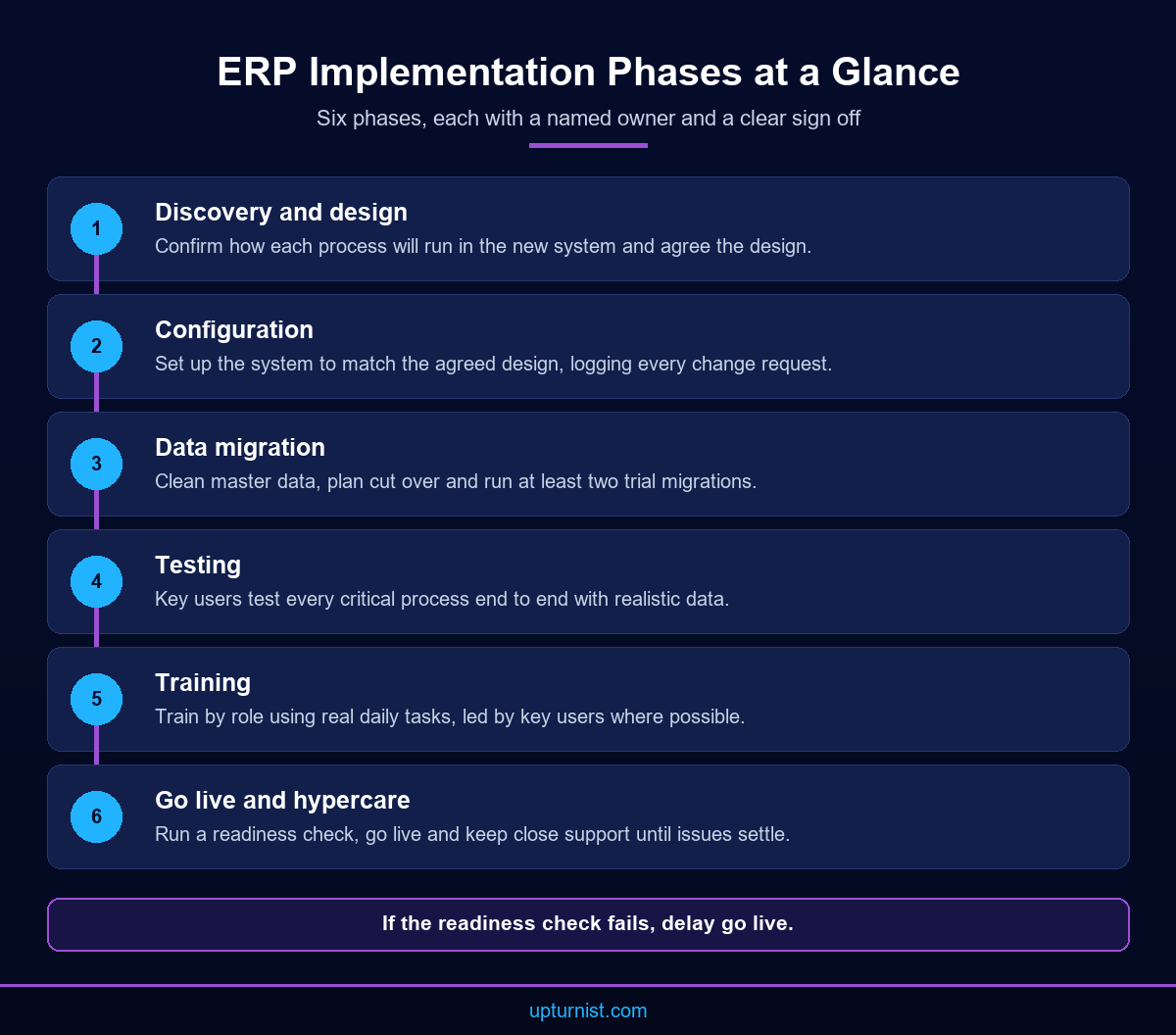
A typical sequence has six phases. Discovery and design confirm how each process will run in the new system. Configuration sets the system up to match. Data migration moves master data and open transactions. Testing checks every key process end to end. Training prepares users. Go live and hypercare move the business onto the system with close support.
Roles matter as much as phases. On the business side, you need an executive sponsor with authority to make decisions. You need a project manager who coordinates the work, and process owners for areas such as sales, procurement, production and finance. Key users from each department test the system and later train colleagues. On the partner side, you need a project lead, functional consultants and technical staff for data and integration. A simple responsibility matrix makes it clear who does the work, who approves it and who is consulted for every deliverable.
ERP implementation companies differ in how much they expect from the client. Some configure to a written specification and step back. Others work alongside process owners through every phase. Ask early who writes test scripts, who cleans the data and who signs off each phase. Vague answers here lead to arguments later.
ERP consulting also protects the business from scope creep. Log every change request, estimate it and get the sponsor’s approval. Changes that are not essential for go live should move to a second phase list. In strong ERP consulting, the steering group reviews this list at every monthly meeting, so nothing is added quietly.
A published UAE engineering company project shows the value of getting phases right. Its QC reports were prepared manually, which made traceability difficult. In the implemented system, quality inspections were digitised and QC teams generated reports electronically with a complete inspection history. Estimation, production and inventory status became visible on live dashboards. Managers no longer depended on manual coordination to know where each project stood.
Integration, Data Migration and E-Invoicing Readiness
An ERP rarely works alone. It often needs to exchange data with banking, payroll, field apps, machines or customer portals. Integration planning should start during selection, not after go live. List every system that sends or receives data, the direction of flow, how often it runs and who owns each interface.
Data migration deserves its own plan. Data migration is more than copying tables. Master data such as customers, suppliers, items, bills of materials and price lists must be cleaned, de duplicated and mapped to the new structure. Open transactions, such as open orders, stock balances and unpaid invoices, need a cut over plan. Run at least two trial migrations before go live. Ask process owners to check migrated records against source data and sign them off.
Poor data is one of the quickest ways to lose user trust. If stock figures look wrong on day one, people return to their spreadsheets. In the steel manufacturing project mentioned earlier, inconsistent inventory records were part of the original problem. Reduced inventory mismatches were one of the published outcomes.
E-invoicing adds another reason to plan integration carefully. Upturnist’s UAE e-invoicing readiness support notes that the UAE is introducing mandatory e-invoicing for B2B and B2G transactions. Your ERP will need to produce structured invoice data and connect to compliant platforms. The UAE Ministry of Finance website is the place to follow official announcements as the framework develops.
Regional experience helps. According to the published case study, the steel manufacturer in Saudi Arabia went live with a system that is ZATCA Phase 2 compliant and API compatible. ERP consulting for UAE businesses should confirm now that any shortlisted system can export structured invoice data and connect through APIs. That way, compliance does not force a second project later.
Treat integration as a business design question, not only a technical one. Decide which system is the master for each type of data. Customer details, item codes and prices should live in one place. Duplicate masters create mismatches that no interface can fully fix. ERP consulting should produce a simple data ownership table that names the master system and the owner for each data type.
Training and Go Live Support
Training is where many projects cut corners. It is also where users decide whether to trust the new system. Train by role, not by module. A storekeeper needs to receive goods, issue materials and count stock. A planner needs work orders and schedules. A finance user needs invoicing, receipts and month end. Each role should practise its real daily tasks with realistic data.
Use a train the trainer model. Key users who helped design and test the system teach their colleagues. They speak the same language as the team, and they stay after the consultants leave. Support them with short guides and updated procedures, so the new way of working is written down.
Timing matters too. Train users close to go live, not months before, so the steps stay fresh. Give every user a practice environment with sample data. Let them make mistakes there, not in the live system. Record short screen walkthroughs of the most common tasks for new joiners.
Before go live, run a readiness check. Are migrated balances signed off? Has user acceptance testing passed for every critical process? Are users trained and logins working? Is there a cut over plan for open orders? Is support staffed for the first weeks? If any answer is no, delay go live. A short delay costs less than a failed start.
The first weeks after go live, often called hypercare, need close support. Set up a simple way to log issues, hold a short daily review and fix blocking problems quickly. Track the issue log until it settles at a stable level. Good ERP consulting includes this period in both the plan and the budget.
Change management runs through all of it. People need to understand why the business is changing and what it means for their job. Clear communication and visible leadership support reduce resistance. In the general contracting project, timesheets had been prepared manually and submitted after project completion, which delayed invoicing. Moving to digital timesheets meant field teams, not only office staff, had to adopt the new process.
Measuring ERP Success After Go Live
Go live is not the finish line. The value of ERP consulting shows in how the business runs months later. Define success measures before the project starts, record a baseline and review the same measures after go live.
Pick measures tied to the problems that justified the project. If job profitability was unclear, track how many jobs show estimated versus actual cost and how quickly variances become visible. If inventory was unreliable, track stock count accuracy. If billing was slow, track the time from timesheet approval or delivery to invoice. If reporting took days, track how long month end close takes.
Use the system’s own dashboards for these measures. Both fabrication case studies published by Upturnist highlight executive dashboards that show production performance, inventory and project status in real time. Dashboards only help if someone reviews them on a fixed rhythm and acts on what they show.
Measure adoption as well. Are users entering data in the system, or still keeping side spreadsheets? Are approvals happening in the workflow, or by email? Low adoption usually points to a training gap, a missing report or a process that does not fit. Ask your ERP consulting partner to include adoption checks in each review, not just system health.
Plan a structured review a few months after go live, then repeat it. Compare results with the baseline. List what works, what users avoid and what the next phase should add. Many businesses keep a backlog of second phase improvements, such as planned maintenance or operational excellence programmes for quality and inspections.
This is where an implementation focused partner differs from a software reseller. ERP consulting that stays involved after go live helps the business improve the way it operates, not just install software. The goal is a business that is ready to scale on clean data and clear processes.
Conclusion
ERP consulting works best when it follows your operations. Map processes, rank requirements, compare options with your own data, implement in clear phases and measure results after go live. The software matters, but the method matters more. UAE manufacturers, fabricators and contractors can also use the project to prepare for e-invoicing. To see how this applies on the factory floor, explore our manufacturing and industrial solutions. If you are planning a new ERP or rescuing one that is not delivering, talk to our consultants about a business first, implementation focused review.
Frequently Asked Questions
What does ERP consulting include?
It includes process review, requirements, selection support, implementation planning, integration, data migration, training and post go live measurement. The aim is a system that fits how your business operates, chosen on evidence and adopted by the people who use it daily.
How do I choose between ERP consulting companies?
Ask each firm to explain its method, name the people who will do the work and describe its support after go live. Check references from similar businesses. Prefer firms that map your processes before discussing any software.
What is a vendor neutral ERP consulting firm?
It is an adviser with no commercial tie to the options it evaluates. It compares systems against your ranked requirements, scripted demos and total cost, and it records the reasons for its recommendation so your steering group can check them.
Should a UAE fabricator choose a generic ERP or an industry ERP?
It depends on how close your workflow is to the industry norm. Fabricators with job costing, drawings and work orders at the core often benefit from industry fit, which reduces customisation. Test both routes against your own requirements first.
Who should lead an ERP project inside the business?
An executive sponsor should own decisions and priorities. A project manager coordinates daily work. Process owners for sales, procurement, production and finance sign off designs, and key users test the system and later train their colleagues.
How should we prepare data for a new ERP?
Clean and de duplicate master data such as customers, suppliers, items and price lists. Agree a cut over plan for open orders and stock. Run at least two trial migrations and ask process owners to sign off results.
Does a new ERP need to support UAE e-invoicing?
Yes, it should be ready. The UAE is introducing mandatory e-invoicing for B2B and B2G transactions. Check that any shortlisted system can produce structured invoice data and connect to compliant platforms through APIs before you sign a contract.
How do we measure whether ERP consulting delivered value?
Set baseline measures before the project, such as job cost visibility, stock accuracy, billing time and month end close. Review them after go live. You can see how similar measures appear in published Upturnist case studies.
Why does Upturnist start with business processes rather than software?
Technology alone does not fix operational problems. Upturnist follows a business first approach: understand the business, improve how it works, then implement technology. You can find out about the Upturnist team and approach on our website.