
The right equipment rental management software provider gives contractors one place to register equipment, assign operators, capture timesheets and raise invoices. If your fleet still runs on phone calls, whiteboards and paper timesheets, that single system is the fix. Billing waits for paperwork, machines get double booked, and nobody can say which assets earn their keep. This guide follows the rental workflow step by step, from the register to the invoice. It draws on a general contracting rental rollout Upturnist delivered in the UAE.
Key Takeaways
- An equipment rental management software provider should connect the equipment register, assignments, timesheets and billing, so each step feeds the next.
- Good equipment rental software for general contractors prevents double bookings and turns approved timesheets straight into invoices.
- Judge any option on your own workflow, your data and the people who will use it on site.
What the Software Should Manage
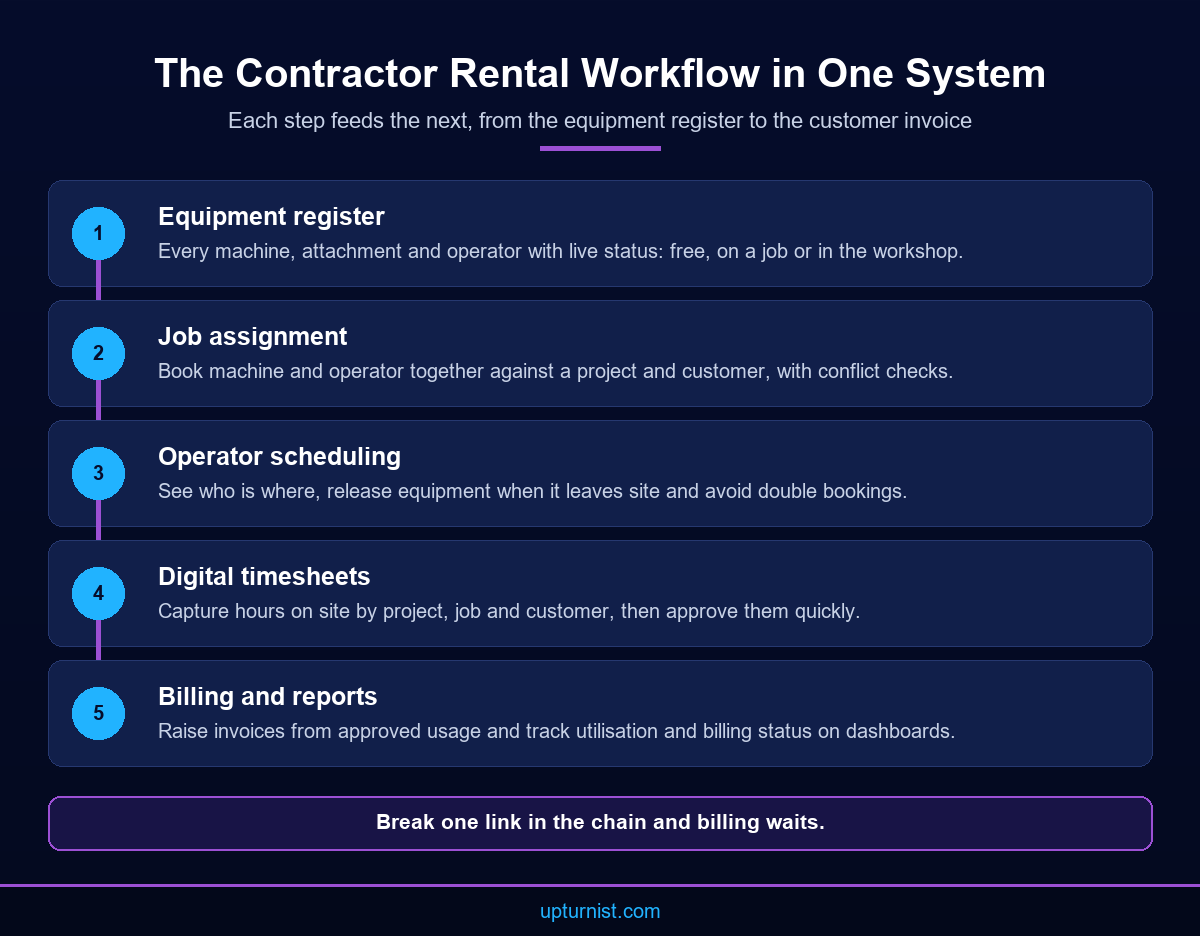
A contractor’s rental workflow has five linked steps: keep a register of equipment and operators, assign them to jobs, schedule the operators, capture timesheets and bill the customer. Equipment rental software for general contractors should hold all five in one system. When each step lives in a different file, errors pass silently from one to the next.
Start with the register. It should list every machine, attachment and operator, with their current status. A planner should see at a glance what is free, what is on a job and what is in the workshop. The heavy equipment in a typical contracting fleet is expensive to own. Every idle day costs money.
The register is also where operators belong. Ask any equipment rental management software provider to show how it links the two. A crane without a qualified operator is not really available. So the system should link machines and people, and show both together.
Finally, the register must stay current. If site teams cannot update status from their phones, the data goes stale within days. A mobile app is not a luxury here. It is how the register stays true.
Before any system goes live, agree what each status means. “Available” should mean fuelled, serviced and ready to leave the yard. “On hire” should mean committed to a named project. Clear definitions stop arguments between planners and site teams later.
Assignments and Operator Scheduling Without Double Bookings
Double bookings happen when two planners promise the same machine from two different lists. The cure is a single assignment screen that checks availability before it confirms a job. Equipment and operators should be booked together, against a project and a customer, so every assignment carries the details billing will need later.
In the UAE case study, the contractor managed hundreds of equipment movements and operator assignments across multiple projects. Allocation was coordinated by hand. The result was scheduling conflicts, double bookings and poor use of equipment and manpower.
After RentO, which Upturnist implements, went live, planners assigned equipment and operators to projects from one platform. The system blocked conflicting bookings. Allocation became faster, and management could see who was where.
Three habits make this work in practice:
- Book the machine and the operator in the same step.
- Record the project, the customer and the expected duration on every assignment.
- Release equipment in the system the moment it leaves site, not at month end.
These habits sound basic. Yet most scheduling conflicts trace back to one of them being skipped. A system can enforce the rules, but planners still need to agree them first.
Digital Timesheets: The Link Between Site Work and Revenue
A timesheet is the record of hours a machine and its operator worked. For a contractor, it is also the basis of the invoice. When timesheets are written on paper and handed in after the job ends, reporting and billing both wait. Digital timesheets, captured on site and approved quickly, remove that delay.
The case study contractor had exactly this problem. Timesheets were prepared by hand and submitted after project completion. That delayed operational reporting and customer invoicing, which in turn squeezed cash flow.
The new system captured timesheets digitally. They could be viewed by project, by job, by customer and by time period. That flexibility matters. A project manager wants hours per site. Finance wants hours per customer. Management wants utilisation across the whole fleet.
When you review any system, test the timesheet flow with a real week of your own data. Check who enters hours, who approves them and how disputes are handled. Ask what happens when an operator moves between two sites in one day. The answers tell you more than any demo.
Set a daily or weekly approval rhythm too. Hours approved within a day or two are easy to check while the site supervisor still remembers the work. Hours approved a month later invite disputes. Customers are also more likely to accept an invoice when each line traces to a record they signed off.
Billing From Approved Timesheets
Billing should be the easy part. If the assignment holds the rate and the customer, and the timesheet holds the approved hours, the invoice almost writes itself. The aim is simple: no retyping between site records and finance. Every invoice line should trace back to an approved timesheet that the customer can check.
In the case study, the platform generated customer invoices directly from approved equipment usage and digital timesheets. The outcomes listed on the page include faster invoice generation and payment processing, and less manual reporting and paperwork.
There is a second benefit. When billing data comes from the same source as operations, the reports agree. Management dashboards showed equipment utilisation, operator assignments, pending timesheets and billing status in one view. A finance lead can spot unbilled work before month end, not after.
If your business also issues tax invoices through an ERP, confirm early how rental invoices will reach it. Keep the rental system as the source of the usage data, and avoid two teams keying the same figures. Our ERP and workflow automation solutions cover how these systems should connect.
Also decide how rates are held. Hourly, daily and monthly rates, minimum hours and operator charges should sit on the assignment, not in a separate spreadsheet. Then every invoice uses the agreed commercial terms by default.
How to Choose an Equipment Rental Management Software Provider
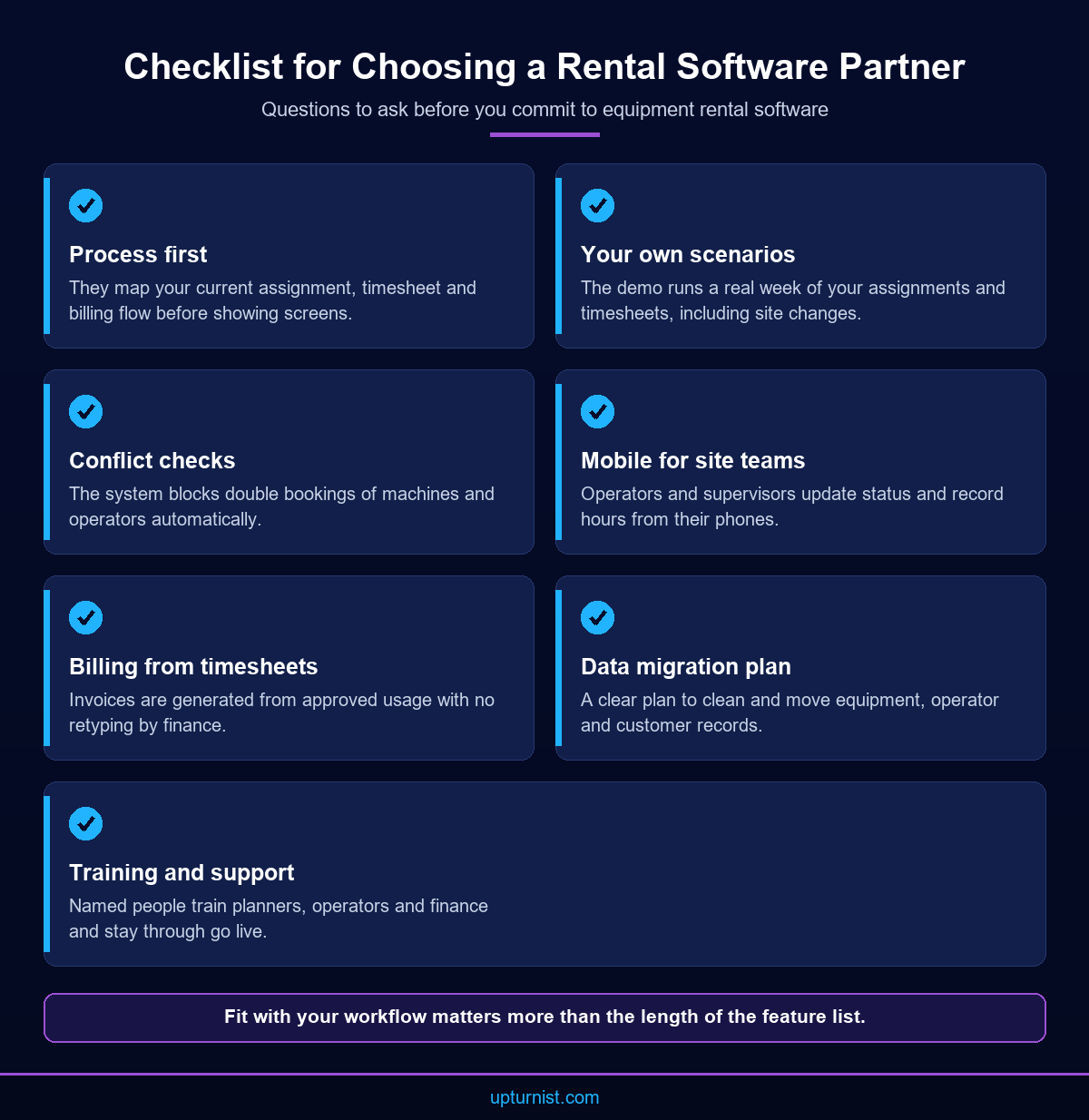
Choosing an equipment rental management software provider is less about feature lists and more about fit with how your planners, operators and finance team already work. Look for a partner that maps your workflow first, then configures the system, trains your people and stays for go live. Software alone rarely fixes a broken process.
Use these questions in your first meetings:
- Will they walk through your current process before they show a screen?
- Can the system run your real assignment and timesheet scenarios, including mid day site changes?
- Does it offer a mobile app for site teams and live dashboards for management?
- How will your existing equipment, operator and customer data be cleaned and moved?
- Who trains planners, operators and finance, and who supports you after go live?
A good equipment rental management software provider will also be honest about what the system will not do. Upturnist works business first, process second and technology third. Our digital transformation services and field operations automation work follow that order, so the system matches the way your teams operate.
Plan for adoption as well as configuration. Operators need a short, practical session on the mobile app. Planners need to trust the availability view enough to retire their old lists. A phased go live, starting with one project or one equipment group, builds that trust quickly.
Conclusion
Equipment rental is a chain. The register feeds assignments, assignments feed timesheets, and timesheets feed invoices. Break one link and cash flow suffers. The right equipment rental management software provider keeps that chain in one system, with a mobile app for site teams and live dashboards for management. Start by mapping your current workflow and the points where paperwork slows billing. Then test any option with your own data. If you want help to improve the way you operate across your fleet, talk to our consultants about your rental workflow.
Frequently Asked Questions
What does an equipment rental management software provider do?
It supplies and implements a system that manages the rental lifecycle. That covers the equipment register, job assignments, operator scheduling, timesheets, invoicing and reporting. A good partner also maps your process, moves your data and trains the people who will use it.
What is equipment rental software for general contractors?
It is software that helps a contractor manage its own fleet of machines and operators across projects. It tracks availability, prevents double bookings, captures timesheets on site and turns approved usage into customer invoices without retyping.
How do digital timesheets speed up billing?
Digital timesheets are captured on site and approved quickly, instead of being handed in after the job ends. Because the approved hours already sit in the system, invoices can be generated directly from them. This removes manual retyping and shortens the billing cycle.
How does rental software prevent double bookings?
It keeps one live record of every machine and operator. Before an assignment is confirmed, the system checks availability against existing bookings. If the asset is already committed, the planner sees the conflict at once and can choose another unit.
Do site teams need a mobile app?
Yes, in most cases. Operators and supervisors work on site, not at a desk. A mobile app lets them update equipment status and record hours where the work happens, which keeps the register and timesheets accurate every day.
Which businesses benefit from equipment rental management?
The case study page lists general contractors, equipment rental companies, construction and infrastructure contractors, and civil engineering firms. Oil and gas service providers, quarry operations, heavy transport companies and facility management companies with operators and project based work also fit.
What reports should management expect from rental software?
Management should see equipment utilisation, operator assignments, ongoing projects, pending timesheets and billing status. These views show which assets earn their keep, where hours are waiting for approval and which work has not yet been invoiced.
How long does it take to implement rental management software?
It depends on fleet size, data quality and how many teams are involved. Mapping the workflow, cleaning equipment and customer data, and training planners usually take the most effort. A phased rollout lets you prove each step before moving on.
Can rental software connect to our accounting or ERP system?
It often can, and that link should be planned early. The rental system should remain the source of usage data, while finance receives invoice information without double entry. Our technology consulting team can review how your systems should connect.
Where can I see examples of Upturnist projects?
Upturnist has published anonymised examples across contracting, manufacturing, oil and gas and infrastructure. You can browse them in our project case study library to see the problems, solutions and outcomes in each sector.